My setup
This is a small file to show you what my setup looks like. 😀
Fix the things you repeat everyday. They constitute 50% of your life.
Jordan Peterson
Summary
Section titled “Summary”VS Code
Section titled “VS Code”Fira Code is a free monospaced font containing ligatures for common programming multi-character combinations. This is just a font rendering feature: underlying code remains ASCII-compatible. This helps to read and understand code faster. For some frequent sequences like .. or //, ligatures allow us to correct spacing.
Fira Code
You can download it from here
To use it in VS Code, follow these explanations
TL;DR:
Add this to your VS Code settings.JSON:
"editor.fontFamily": "Fira Code","editor.fontLigatures": true,Bonus: you can setup the same font (and its ligatures) in your Terminal to get the additional goodness. You should do it before running the PowerLevel10k configuration.
Extensions
Section titled “Extensions”All around
Section titled “All around”-
GitHub Copilot
-
IntelliCode
-
Better Comments
-
Code Spell Checker
-
Live Share
-
Path Intellisense
-
Rewrap
-
OXC
-
ESLint
-
Prettier
- htmltagwrap
- CSS Peek
- Stylelint
- BabelJavaScript
- JS Refactoring Assistant (P42)
- Vitest
Markdown
Section titled “Markdown”- Markdown All in One
- MDX
- (markdownlint)
- npm Intellisense
- Deno
- Bun for Visual Studio Code
- Git Graph
- Git Lens
Customization
Section titled “Customization”- Material Icon Theme
Settings
Section titled “Settings”Here are some VS Code Settings. Only copy the line you understand and want to use.
{  // ─── Telemetry ────────────────────────────────────────────────────────────  "telemetry.telemetryLevel": "off",
  // ─── Editor ───────────────────────────────────────────────────────────────  "editor.autoIndentOnPaste": true,  "editor.bracketPairColorization.enabled": true,  "editor.foldingImportsByDefault": true,  "editor.fontFamily": "'Monaspace Neon', 'FiraCode Nerd Font', 'FiraCode Nerd Font Mono', consolas, 'Courier New', monospace",  "editor.fontLigatures": "'calt', 'ss01', 'ss02', 'ss03', 'ss04', 'ss05', 'ss06', 'ss07', 'ss08', 'ss09', 'liga'",  "editor.fontSize": 14,  "editor.formatOnPaste": true,  "editor.formatOnSave": true,  "editor.guides.bracketPairs": "active",  "editor.inlineSuggest.enabled": true,  "editor.inlineSuggest.showToolbar": "always",  "editor.linkedEditing": true,  "editor.minimap.enabled": false,  "editor.quickSuggestions": {    "other": true,    "comments": false,    "strings": false  },  "editor.renderWhitespace": "trailing",  "editor.suggest.preview": true,  "editor.suggestSelection": "recentlyUsedByPrefix",  "editor.tabSize": 2,  "editor.tokenColorCustomizations": {    "textMateRules": [      {        "scope": "comment",        "settings": {          "fontStyle": "italic"        }      }    ]  },
  // ─── Diff Editor ──────────────────────────────────────────────────────────  "diffEditor.codeLens": true,  "diffEditor.experimental.showMoves": true,  "diffEditor.ignoreTrimWhitespace": false,
  // ─── Emmet ────────────────────────────────────────────────────────────────  "emmet.triggerExpansionOnTab": true,
  // ─── Explorer ─────────────────────────────────────────────────────────────  "explorer.autoRevealExclude": {    "**/node_modules": true  },  "explorer.compactFolders": false,  "explorer.confirmDelete": false,  "explorer.confirmDragAndDrop": false,  "explorer.confirmPasteNative": false,
  // ─── Files ────────────────────────────────────────────────────────────────  "files.associations": {    ".env": "env",    ".env.dev": "env",    ".env.production": "env",    "*.snap": "typescriptreact"  },  "files.autoSave": "afterDelay",  "files.autoSaveDelay": 10000,
  // ─── Git ──────────────────────────────────────────────────────────────────  "git.autofetch": true,  "git.confirmSync": false,  "git.enableSmartCommit": true,  "git.openRepositoryInParentFolders": "always",  "git.useCommitInputAsStashMessage": true,
  // ─── Terminal ─────────────────────────────────────────────────────────────  "terminal.external.osxExec": "Ghostty.app",  "terminal.integrated.cursorStyle": "line",  "terminal.integrated.cursorStyleInactive": "line",  "terminal.integrated.enablePersistentSessions": true,  "terminal.integrated.fontFamily": "\"MesloLGS NF\", \"FiraCode Nerd Font\"",  "terminal.integrated.fontSize": 13,  "terminal.integrated.fontLigatures.enabled": true,  "terminal.integrated.gpuAcceleration": "on",  "terminal.integrated.scrollback": 10000,  "terminal.integrated.sendKeybindingsToShell": true,  "terminal.integrated.shellIntegration.decorationsEnabled": "both",  "terminal.integrated.shellIntegration.enabled": true,  "terminal.integrated.stickyScroll.enabled": true,  "terminal.integrated.tabs.enabled": true,
  // ─── Window ───────────────────────────────────────────────────────────────  "window.customTitleBarVisibility": "windowed",  "zenMode.showTabs": "none",
  // ─── Workbench ────────────────────────────────────────────────────────────  "workbench.browser.enableChatTools": true,  "workbench.colorTheme": "Catppuccin Frappé",  "workbench.editor.empty.hint": "hidden",  "workbench.editor.revealIfOpen": true,  "workbench.externalBrowser": "/Applications/Brave Browser.app",  "workbench.iconTheme": "catppuccin-frappe",  "workbench.layoutControl.enabled": false,  "workbench.panel.showLabels": false,  "workbench.preferredDarkColorTheme": "One Dark Pro",  "workbench.sideBar.location": "right",  "workbench.startupEditor": "newUntitledFile",  "workbench.tree.enableStickyScroll": true,
  // ─── Security ─────────────────────────────────────────────────────────────  "security.workspace.trust.untrustedFiles": "open",
  // ─── CSS ──────────────────────────────────────────────────────────────────  "css.format.spaceAroundSelectorSeparator": true,  "css.lint.duplicateProperties": "warning",  "css.lint.float": "warning",  "css.lint.ieHack": "warning",
  // ─── JSON ─────────────────────────────────────────────────────────────────  "json.format.enable": true,
  // ─── Markdown ─────────────────────────────────────────────────────────────  "markdown.preview.fontFamily": "\"Atkinson Hyperlegible Next\", system-ui, sans-serif",
  // ─── JS / TS ──────────────────────────────────────────────────────────────  "js/ts.format.semicolons": "remove",  "js/ts.preferences.preferTypeOnlyAutoImports": true,  "js/ts.updateImportsOnFileMove.enabled": "always",
  // ─── GitHub Copilot ───────────────────────────────────────────────────────  "github.copilot.chat.codesearch.enabled": true,  "github.copilot.chat.languageContext.fix.typescript.enabled": true,  "github.copilot.chat.languageContext.inline.typescript.enabled": true,  "github.copilot.chat.languageContext.typescript.enabled": true,  "github.copilot.chat.localeOverride": "en",  "github.copilot.chat.scopeSelection": true,  "github.copilot.nextEditSuggestions.allowWhitespaceOnlyChanges": false,  "github.copilot.nextEditSuggestions.enabled": true,
  // ─── Chat ─────────────────────────────────────────────────────────────────  "chat.editing.confirmEditRequestRemoval": false,  "chat.editing.confirmEditRequestRetry": false,  "chat.viewSessions.orientation": "stacked",
  // ─── GitHub Pull Requests ─────────────────────────────────────────────────  "githubPullRequests.createOnPublishBranch": "never",  "githubPullRequests.pullBranch": "never",
  // ─── CSpell ───────────────────────────────────────────────────────────────  "cSpell.language": "en,fr",
  // ─── Extensions ───────────────────────────────────────────────────────────  "color-highlight.hslWithNoFunctionLanguages": ["*"],  "color-highlight.languages": ["*"],  "color-highlight.markRuler": false,  "htmltagwrap.tag": "div",  "imageCarousel.explorerContextMenu.enabled": true,  "liveServer.settings.CustomBrowser": "chrome",  "liveServer.settings.donotShowInfoMsg": true,  "oneDarkPro.editorTheme": "One Dark Pro",  "p42.refactoring.convertLoopToForOf.suggestion": "warning",  "p42.refactoring.useEqEqNull.suggestion": "off",  "prettier.arrowParens": "avoid",  "prettier.documentSelectors": ["**/*.gts", "**/*.gjs"],  "prettier.semi": false,  "prettier.singleQuote": true,  "prettier.trailingComma": "all",  "quokka.automaticRestart": true,  "quokka.showStartViewOnFeatureRelease": false,  "rewrap.autoWrap.enabled": true,  "rewrap.wrappingColumn": 80
  // ─── Language overrides ───────────────────────────────────────────────────  // ...}
For a more thorough setup see the settings.json file.
Package manager
Section titled “Package manager”The Missing Package Manager for macOS
Homebrew
To install brew:
/bin/bash -c "$(curl -fsSL https://raw.githubusercontent.com/Homebrew/install/HEAD/install.sh)"Terminal
Section titled “Terminal”Ghostty is a fast, feature-rich, and cross-platform terminal emulator that uses platform-native UI and GPU acceleration.
Ghostty
To install it using brew: brew install ghostty
Check if you have it by running zsh --version.
If it is not already installed on your system, install it using brew: brew install zsh.
Framework
Section titled “Framework”Oh My Zsh will not make you a 10x developer…but you may feel like one!
Oh My Zsh
An awesome shell with autocompletion, history, alias, plugins, etc.
Install it by running:
sh -c "$(curl -fsSL https://raw.github.com/ohmyzsh/ohmyzsh/master/tools/install.sh)"Plugins
Section titled “Plugins”To install a plugin in ZSH, open your .zshrc file: code ~/.zshrc, or nano ~/.zshrc or open ~/.zshrc.
In this file, locate the line which starts with plugins= and simply write the name of the plugins you want to use.
Then save.
Here is a list of some of the plugins I use:
- aliases
- bun
- colored-man-pages
- colorize
- command-not-found
- fzf
- git
- history
- vscode
- zoxide
- zsh-autocomplete
- zsh-autosuggestions
- zsh-syntax-highlighting
Powerlevel10k is a theme for Zsh. It emphasizes speed, flexibility and out-of-the-box experience.
PowerLevel10k
Follow the readme to install it and set it up.
TL;DR:
git clone --depth=1 https://github.com/romkatv/powerlevel10k.git ${ZSH_CUSTOM:-$HOME/.oh-my-zsh/custom}/themes/powerlevel10k- Restart
zsh - Then run the interactive configuration:
p10k configure
Below is what the interactive configuration looks like:
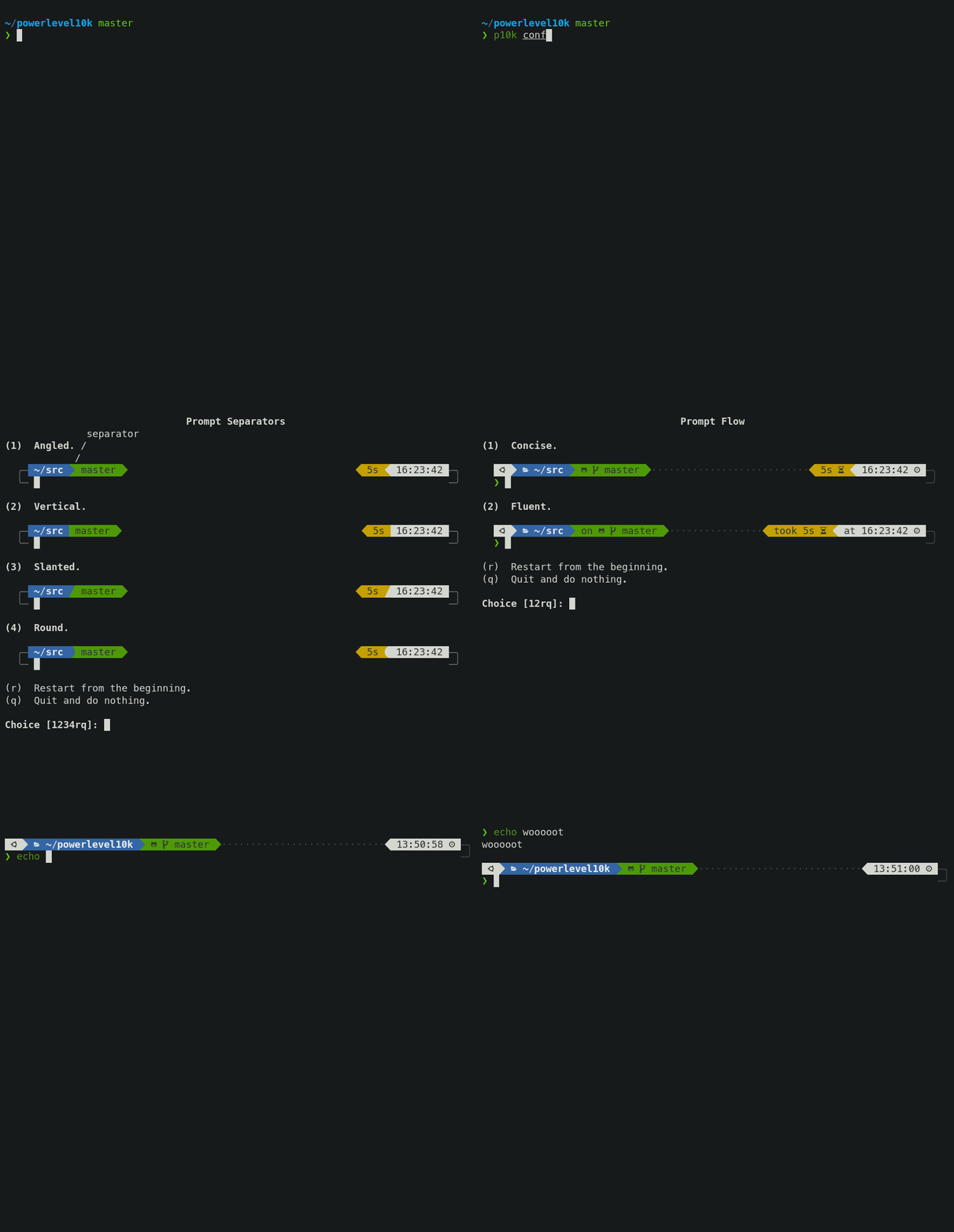
A good overview of the terminal setup can be found here: HowToGeek
Aliases
Section titled “Aliases”Aliases are shortcuts for other terminal commands.
The simplest way to list all the available aliases on your system
aliasUsually there will be lots of them. You can search for specific aliases using
the pipe operator | and grep.
alias | grep gitHere are the ones I’ve setup:
# Shellalias ".."="cd .."alias "..."="cd ../.."alias "...."="cd ../../.."alias as="alias | grep "alias c="clear"alias cat="bat"alias cd-="z -"alias cd="z"alias copy="rsync -ah --info=progress2"alias cwd="pwd"alias htop="btop"alias la="eza -laF --git  --icons --group-directories-first"alias ll="eza -lF --git --icons --group-directories-first"alias ls="eza -F --git --icons --group-directories-first"# List directory in tree format with icons and limit depth to 2alias lst="eza -lF --git --tree --icons --level=2"alias top="btop"# Print each element of PATH on a new linealias trail="<<<${(F)path}"alias z-="z -"alias zz="z -"# Update all package managers and system softwarealias update="brew update && brew upgrade && tldr --update && mas upgrade && system_update"alias system_update="sudo softwareupdate --install --all --verbose"alias python="python3"alias vsc="code ."
# ZSHalias zshrc="code ~/.dotfiles && code ~/.zshrc"
# GITalias gac="git add -A && git commit -m"# List git branches with detailed formatted informationalias gbr+="git branch --format='%(HEAD) %(color:yellow)%(refname:short)%(color:reset) - %(contents:subject) %(color:green)(%(committerdate:relative)) [%(authorname)]' --sort=-committerdate"alias gca="git commit --amend --no-edit"# Clean merged local git branches excluding main, master, and devalias gclean="git remote prune origin && git switch main && git branch --merged | grep -Ev '(^\*|master|main|dev)' | xargs git branch -d"alias gco---="git checkout @{-3}"alias gco--="git checkout @{-2}"alias gco-="git checkout -"alias gco-2="gco--"alias gco-3="gco---"alias gcod="git checkout dev"alias gcom="git checkout main"alias gdel="git branch -D"alias gla="git pull --all && git fetch --all"alias glm="glol main..HEAD"alias gstat="git shortlog -sne --since='1 year ago'"# Show last commit with formatted detailsalias glast="git log -1 --pretty=format:\"%C(auto)%h %s %Cgreen(%ar)\""alias glog1w="glol --since='1 week ago'"alias glog1m="glol --since='1 month ago'"alias glog1y="glol --since='1 year ago'"alias glogg-="glol --grep="# Display a graphical git log for commits on current branch with formattingalias glolm="git log --graph --pretty=\"%Cred%h%Creset -%C(auto)%d%Creset %s %Cgreen(%ar) %C(bold blue)<%an>%Creset\" main..HEAD"# Graphical git log with commit statsalias glolsm="glolm --stat"alias gmm="git merge main"# Switch to main branch and update remote branchesalias gmu="git switch main && git pull --all && git fetch --all"# Push current branch with setting upstream trackingalias gpo="git push --set-upstream origin \$(git branch --show-current)"alias gpf="git push --force-with-lease"alias gt="git tag"alias gta="git tag -a"alias gundo="git reset --soft HEAD^"
# Brewalias bbd="brew bundle dump --force --describe --file='~/.dotfiles/Brewfile'"alias bubu="brew update && brew upgrade"
# Pnpmalias pm="pnpm"alias pad="pnpm add -d"alias pb="pnpm build"alias pd="pnpm dev"alias pdev="pnpm dev"alias pf="pnpm format"alias pii="pnpm install"alias plf="pnpm lint:fix"alias pln="pnpm lint"alias prm="pnpm remove"alias prun="pnpm run"alias pst="pnpm start"alias pt="pnpm test"
# Yarnalias ylf="yarn lint:fix"alias yst="BROWSER=none yarn start"alias yta="yarn test:all"
# Bunalias b="bun"alias ba="bun add"alias bad="bun add -d"alias bb="bun run build"alias bdev="bun run dev"alias bf="bun run format"alias bi="bun install"alias blf="bun run lint:fix"alias bln="bun run lint"alias brm="bun remove"alias brun="bun run"alias bst="bun run start"alias bt="bun test"
# Denoalias dd="deno doc"alias df="deno fmt"alias dl="deno lint"alias dr="deno run"alias dta="deno task"alias dt="deno test"alias dtw="deno test --watch"alias dtc="deno task check" # something like "deno lint && deno fmt && deno test --reporter=dot --coverage --parallel"alias dtd="deno task dev" # something like "deno lint --watch & deno fmt --watch & deno run --allow-net --allow-env --allow-read --watch ./path/to/entry.ts"alias dtdoc="deno task docs" # something like "deno doc --html --name='name-of-my-app' ./path/to/entry.ts"alias dtl="deno task cache" # something like "deno cache --lock=deno.lock --lock-write ./path/to/entry.ts"
See .zshrc file for a more complete description, sources, functions, etc.
Functions
Section titled “Functions”You can also write functions in shell. Here are some of mine:
# Go to directory (`cd`) then list what's in it (`ls`)function cl() {  DIR="$*";    # if no DIR given, go home    if [ $# -lt 1 ]; then      DIR=$HOME;  fi;  builtin cd "${DIR}" && \  # use your preferred ls command    ls}
# Create directory and cd into itmkcd() {  mkdir -p "$@" && cd "$_"}
# You fix the bug, stage only the changes related to the bug and execute# This will create a branch called bugfix based off master with only the bug fixfunction gmove() {  git stash -- $(git diff --staged --name-only) &&  gwip ;  git branch $1 $2 &&  git checkout $1 &&  git stash pop}
# You fix the bug, stage only the changes related to the bug and execute# This will create a branch called bugfix based off master with only the bug fixfunction killport() {  kill -9 $(lsof -t -i:$1)}
# Function to rename a file from Pascal case or snake case to kebab casefunction kebabify() {  # Check if at least one filename is provided as an argument  if [ "$#" -eq 0 ]; then    echo "Usage: pascal_snake_case_to_kebab <filename1> [<filename2> ...]"    return 1  fi
  # Iterate over all provided filenames  for file in "$@"; do    # Convert Pascal case or snake case to kebab case using sed and tr    new_name=$(echo $file | sed -E 's/([a-z0-9])([A-Z])/\1-\2/g; s/_/-/g' | tr '[:upper:]' '[:lower:]')
    # Rename the file    mv "$file" "$new_name"
    echo "File renamed from $file to $new_name"  done}
GitHub
Section titled “GitHub”GitHub Template
Section titled “GitHub Template”In the repo you want to make into a template go to Settings > Options > Settings.
Activate the [ ] Template repository checkbox
GitHub Page
Section titled “GitHub Page”In your new repo go to Settings > Options > GitHub Pages.
Activate it by choosing which branch to publish (ie. main).
Copy the url newly displayed in the GitHub Pages section.
Paste it in the About > Website of your project’s main page (Code).